Best ATVI 390 Interactive Flat Panel for Teaching | ATVI 390 Smart Board
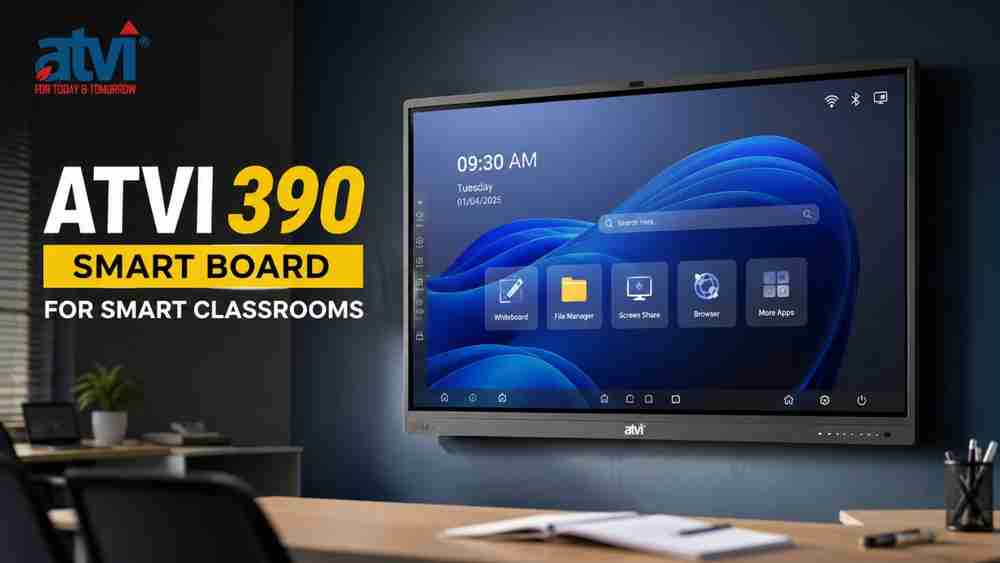
The ATVI 390 is designed as a feature-rich interactive flat panel for modern classrooms, combining 4K visual clarity, 40-point touch interaction, built-in Android tools, subject-specific learning applications, extensive connectivity, and optional AI-powered teaching support.
For schools, coaching institutes, colleges, training centres, and educators looking to move beyond traditional teaching methods, an interactive flat panel can bring digital content, annotation, multimedia, simulations, and collaborative activities onto a single classroom display.
The ATVI 390 Smart Board, part of ATVI's AI Fusion Series, is positioned around three key ideas: flexibility, focused subject-specific learning, and fortified functionality. The brochure highlights 32 universally compatible ports and plug-in points, multiple subject-specific tools, 40 touch points, and hundreds of built-in features.
What Is the ATVI 390 Interactive Flat Panel?
The ATVI 390 Interactive Flat Panel is an interactive digital display designed for classroom and teaching environments. It combines a large-format display with touch interaction, an integrated Android system, classroom software, screen-sharing capabilities, and multiple connectivity options.
The TR390 data sheet lists the panel in 65-inch, 75-inch, and 86-inch sizes, with a 16:9 aspect ratio and 3840 × 2160 resolution. The display uses tempered anti-glare glass and is specified at 450 cd/m² brightness, with a 178° horizontal/vertical viewing angle.
This makes the ATVI 390 relevant for environments where teachers need to display presentations, videos, diagrams, digital notes, simulations, and other visual teaching material.
ATVI 390 Smart Board: Key Features
1. 4K UHD Display
The ATVI 390 has a 3840 × 2160 resolution and a 16:9 aspect ratio. Its display specifications also include a 5500:1 contrast ratio, 450 cd/m² brightness, 178° viewing angle, and 1.07 billion colours with 10-bit colour depth.
The panel also features an anti-glare layer and tempered glass, supporting a more practical viewing experience in classroom environments.
2. 40-Point Touch Interaction
Interactive teaching depends heavily on responsive touch functionality. The ATVI 390 supports 40-point multi-touch, along with finger and stylus interaction.
The brochure specifies 4 ms response time and 1.5 mm touch accuracy, while also mentioning palm and elbow rejection and a paper-feel touch experience.
This can be useful when teachers annotate lessons, write on the digital board, demonstrate concepts, or allow multiple users to interact with classroom content.
3. Built-In Android System
The brochure describes the ATVI 390 as having a built-in Android 14.0 system, along with AI Note, browser, split-screen functionality, Play Store, and other applications.
The data sheet lists 8 GB RAM and 128 GB storage.
The brochure has a CPU-description inconsistency: one section states a Quad Core 2.0 GHz ARM A55 CPU, while the data sheet separately lists Core Cortex-A73. Because the supplied material does not reconcile these two descriptions, buyers should confirm the exact processor configuration with the supplier before purchase.
Subject-Specific Teaching Tools
One of the notable aspects of the ATVI 390 is its focus on subject-specific learning.
The brochure describes four categories of learning tools:
- Interactive Tools for different subjects
- Laboratory Tools for model experiments and input-based activities
- Visualizing Tools for understanding real-world interactions
- Simulation Tools for exploring how different conditions can produce different effects
These tools can support teacher-led demonstrations and visual explanations across different subjects.
For example, a teacher can use interactive or simulation-based material when explaining concepts that may otherwise be difficult to demonstrate using only a conventional whiteboard.
AI-Powered Learning Support
The ATVI 390 brochure also presents optional AI functionality designed to support classroom workflows.
The documented AI features include:
- One-tap action to send selected text to AI as a prompt
- Single-tap action to ask AI to elaborate on generated content
- Google-AI integration
- Intelligent relevant results designed to become more aligned with classroom needs over time
The brochure specifically identifies these AI capabilities as optional, so institutions should confirm availability and configuration when requesting a quotation.
Connectivity and Screen Sharing
A smart classroom display needs to work with existing computers, classroom peripherals, networks, and presentation equipment. The ATVI 390 provides a broad selection of interfaces.
The brochure lists:
- USB 3.0
- Type-C
- Touch port
- HDMI IN and HDMI OUT
- RJ45 LAN
- Bluetooth 5.0
- Audio In and Audio Out
- RS232
- OPS support
- VGA
- DisplayPort
- SPDIF
It also lists Wi-Fi connectivity and screen/file sharing through QR scanning or email.
The data sheet further specifies an 80-pin OPS slot, supporting integration with a compatible OPS computing module.
ATVI 390 Specification Table
Specification | ATVI 390 |
Display Size | 65", 75", 86" |
Aspect Ratio | 16:9 |
Display Technology | Tempered, Anti-Glare |
Resolution | 3840 × 2160 |
Brightness | 450 cd/m² |
Contrast Ratio | 5500:1 |
Viewing Angle | 178° H/V |
Bonding | Optical/Zero |
Refresh Rate | 60 Hz |
Pixel Pitch | 0.42975 × 0.42975 mm |
Display Colour | 1.07B (10-bit) |
NTSC | 72% |
Operating System | Android 14.0 |
RAM + Storage | 8 GB / 128 GB |
Touch Technology | Infrared recognition |
Touch Tools | Finger, Stylus |
Multi-Touch | 40 Touch |
Response Time | 4 ms |
Touch Accuracy | ±1.5 mm |
Wi-Fi | 5G / 2.4G |
Bluetooth | 5.0 |
OPS | 80-pin OPS slot |
Front Ports | Type-C, HDMI, USB 3.0 ×2, Touch |
Other Ports | HDMI IN, HDMI OUT, RJ45, RS232, USB, VGA, DisplayPort, Audio In/Out, SPDIF |
Audio | 2 channels; 2 × 20 W |
Power Consumption | 150 W / 250 W / 350 W |
Standby Consumption | ≤0.5 W |
Net Weight | 32 kg / 42 kg / 55 kg |
Gross Weight | 40 kg / 56 kg / 68 kg |
Screen Share | Yes |
Accessories | Power cord, writing pen, rod antenna |
On-board Apps | ATVI AI Note, Bytellow, Pallet, Play Store, Browser, Cloud Drive, System Keeper, Note, Timer, Screen Split, Screen Record, DMS, etc. |
AI | Optional |
The specifications above are transcribed from the supplied TR390 data sheets. The brochure does not clearly map every weight and power value to a particular screen size in the extracted text, so buyers should confirm the size-specific configuration in the quotation.
How ATVI 390 Can Support Modern Teaching
Digital Classroom Teaching
Instead of relying exclusively on a traditional board and separate display equipment, teachers can use an interactive flat panel to present digital lesson material and interact directly with the screen.
Interactive Whiteboard Lessons
The 40-point touch system, finger and stylus support, annotation tools, and writing experience can support board-based teaching activities.
Subject-Wise Visual Learning
Subject-specific interactive, laboratory, visualization, and simulation tools can be useful when teachers want to demonstrate concepts visually or interactively.
Multimedia Presentations
The 4K display and multiple HDMI, USB, Type-C and other interfaces allow compatible multimedia and presentation equipment to be connected.
Video-Based Learning
Teachers can use the large interactive display for compatible video-based educational content, presentations, demonstrations, and classroom resources.
Online and Hybrid Teaching
Connectivity, screen sharing, OPS compatibility, and multiple input/output interfaces can make an interactive flat panel part of a broader online or hybrid teaching setup.
Coaching Institutes and Training Rooms
Coaching institutes can use an interactive panel for presentations, digital notes, diagrams, demonstrations, and subject-specific teaching activities.
Collaborative Learning
The multi-touch capability can support interactive classroom activities where multiple touch interactions are required.
These are practical applications of the documented features. They should not be interpreted as guarantees of specific academic or learning outcomes.
ATVI 390 vs Traditional Teaching Methods
Traditional boards remain useful, but interactive flat panels introduce additional digital capabilities into the teaching environment.
Traditional Teaching | Interactive Flat Panel Approach |
Physical board writing | Digital writing and annotation |
Static diagrams | Digital visuals and interactive content |
Separate multimedia display | Large integrated display |
Manual content changes | Digital lesson resources |
Limited interaction | Multi-touch interaction |
Conventional demonstrations | Interactive and simulation-based tools |
Physical teaching material | Digital content and screen sharing |
The key advantage is not simply replacing a traditional board. It is bringing several teaching resources—visual content, digital writing, multimedia, applications, and interactive tools—into one classroom interface.
Why Choose ATVI 390 for a Smart Classroom?
Schools and institutions evaluating the ATVI 390 digital board can consider several documented characteristics.
Display and Teaching Experience
The 4K resolution, 450 cd/m² brightness, 178° viewing angle, anti-glare tempered glass, and 1.07 billion colour support provide a display platform designed for visual classroom content.
Interactive Functionality
40-point touch, finger and stylus support, palm and elbow rejection, 4 ms response time, and specified touch accuracy provide the core interactive experience.
Connectivity
The combination of Type-C, USB, HDMI, LAN, Bluetooth, audio, RS232, VGA, DisplayPort, and OPS support allows the panel to integrate with different classroom devices.
Built-In Software
The brochure lists applications including ATVI AI Note, Browser, Play Store, Cloud Drive, Note, Timer, Screen Split, Screen Record, System Keeper, and DMS.
Smart Classroom Integration
For an institution planning a smart classroom solution, the combination of display, touch interaction, built-in applications, connectivity, screen sharing, and OPS compatibility can help create a more digitally integrated teaching environment.
What to Consider Before Buying an Interactive Flat Panel
The best interactive flat panel for teaching depends on the institution's actual requirements rather than a single specification.
Before purchasing, schools and educators should evaluate:
- Required screen size
- Display resolution and brightness
- Touch performance
- Built-in operating system and software
- Connectivity requirements
- Screen-sharing needs
- Compatibility with existing computers and classroom equipment
- OPS requirements
- Installation environment
- Warranty and support
- Budget
- Number of classrooms requiring panels
- Future smart classroom expansion
It is also important to request the exact configuration and quotation for the required screen size before placing an order.
Edumark Technologies – ATVI Product Supplier/Reseller in India
Edumark Technologies is a GeM-registered company and a genuine dealer/reseller of ATVI products in India, according to the information provided for this article.
Institutions can contact Edumark Technologies for information regarding the ATVI 390, quotation requirements, product availability, installation requirements, or broader smart classroom requirements.
GeM Seller ID: WQW0260014582399
Phone: +91-8002805461
Email: info@edumarktechnologies.in
Website: www.edumarktechnologies.com
Service Availability: Across India
For current pricing and configuration, customers should contact Edumark Technologies directly, as the supplied brochure does not provide a product price.
Frequently Asked Questions
1. What is the ATVI 390 Smart Board?
The ATVI 390 Smart Board is an interactive touch panel designed for classroom and teaching environments. It is available in 65-inch, 75-inch, and 86-inch sizes and provides 4K resolution, 40-point touch, built-in Android, classroom applications, and multiple connectivity options.
2. Is the ATVI 390 suitable for school classrooms?
Yes. Its interactive touch capabilities, subject-specific learning tools, built-in applications, multimedia connectivity, and screen-sharing functionality make it suitable for classroom environments.
3. What display resolution does the ATVI 390 have?
The supplied brochure specifies a 3840 × 2160 display resolution.
4. How many touch points does the ATVI 390 support?
The ATVI 390 supports 40-point multi-touch and supports finger and stylus interaction. The brochure also specifies a 4 ms response time.
5. What connectivity options are available?
The brochure lists Type-C, USB 3.0, HDMI, Touch, RJ45 LAN, Bluetooth, Wi-Fi, RS232, VGA, DisplayPort, Audio In/Out, SPDIF, and OPS support.
6. Can the ATVI 390 be used for smart classroom teaching?
Yes. Its documented combination of interactive touch, built-in Android applications, subject-specific learning tools, screen sharing, multimedia connectivity, and OPS support can be used as part of a smart classroom setup.
7. Where can I buy the ATVI 390 Smart Board in India?
Customers can contact Edumark Technologies for current ATVI 390 availability and quotation requirements.
Conclusion
The ATVI 390 Interactive Flat Panel brings together a 4K display, 40-point touch interaction, built-in Android functionality, classroom applications, subject-specific learning tools, broad connectivity, screen sharing, and optional AI capabilities.
For schools, coaching institutes, colleges, training rooms, and educators planning a smart classroom digital board, the ATVI 390 can be evaluated against the institution's display size, software, connectivity, installation, support, and budget requirements.
Because configurations and pricing can vary, prospective buyers should review the official product specifications and confirm the exact screen size, hardware configuration, accessories, and current quotation before purchase.
For current ATVI 390 availability, quotation, installation requirements, or smart classroom solutions, contact Edumark Technologies.