Best ATVI TR380 Interactive Flat Panel for Teaching | ATVI TR380 Smart Board
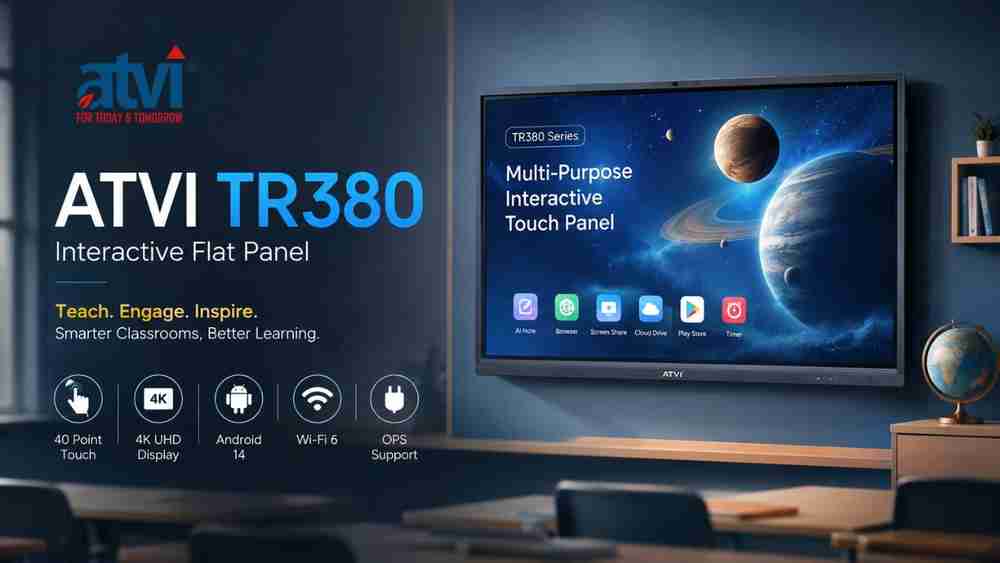
If you are planning a modern smart classroom, the ATVI TR380 Interactive Flat Panel combines a large-format 4K display, 40-point interactive touch, Android 14, classroom-oriented software, multiple connectivity options, and optional camera, microphone, NFC, and Windows integration in one multi-purpose interactive touch panel.
The ATVI TR380 Smart Board is designed around the requirements of classrooms and interactive teaching. The TR380 Series is positioned by ATVI as a “Multi-Purpose Interactive Touch Panel” and a proven performer in classrooms. Its available screen sizes range from 65 inches to 110 inches, giving educational institutions flexibility when planning different classroom environments.
What Makes the ATVI TR380 Interactive Flat Panel Useful for Teaching?
An interactive flat panel can bring digital content, annotation, presentations, visual explanations, and collaborative teaching onto a single classroom display. The ATVI TR380 supports this approach with 4K resolution, infrared touch technology, finger and stylus interaction, built-in Android functionality, screen/file sharing, and a range of physical connectivity options.
The brochure lists 40 touch points, palm and elbow rejection, stylus and finger support, a paper-feel touch experience, and a touch accuracy specification of 1.5 mm.
For schools, coaching institutes, colleges, universities, training centres, and educators planning a smart classroom solution, these features can provide a practical foundation for digital and interactive teaching.
ATVI TR380 Display Features
The ATVI TR380 Series is available in six documented screen sizes:
- 65 inches
- 75 inches
- 86 inches
- 98 inches
- 100 inches
- 110 inches
The panel provides 3840 × 2160 resolution, equivalent to 4K UHD resolution, with a 16:9 aspect ratio. The brochure specifies 450 cd/m² brightness, 1200:1 static contrast, 5000:1 dynamic contrast, and a 178° horizontal/vertical viewing angle. The refresh rate is listed as 60 Hz, while the colour gamut is specified as 72% NTSC.
For classroom environments, the brochure also lists tempered and anti-glare glass, optical bonding, and infrared touch technology. The essentials section additionally describes a 4 mm anti-glare layer, while the detailed section lists 3.0 mm anti-glare tempered glass with 9H hardness. Since these descriptions appear in different parts of the brochure, the exact configuration should be verified before purchase.
40-Point Touch for Interactive Teaching
Touch interaction is one of the central features of an ATVI TR380 digital board.
The brochure documents:
- 40-point multi-touch
- Finger and stylus support
- Palm and elbow rejection
- Paper-feel touch experience
- Infrared touch technology
- Finger or opaque-object touch
- Touch support for Android and Windows
- Touch port for integrating external touch devices
- 1.5 mm touch accuracy
The detailed specification section lists 4 ms touch response time. However, the brochure's essentials section mentions 8 ms response time. This is a source-document discrepancy, so buyers should confirm the applicable response-time specification for the selected TR380 configuration with the supplier.
For teachers, finger and stylus interaction can support digital writing, annotation, demonstrations, and interactive whiteboard-style lessons.
Android 14, 8 GB RAM and 128 GB Storage
The ATVI TR380 includes a built-in Android platform. The brochure lists Android 14.0, 8 GB RAM, and 128 GB storage. It also references an ARM A55 CPU and GPU information including Mali G52*4.
There is a terminology difference within the brochure: the essentials section describes the unit as powered by a Quad Core 2.0 GHz ARM A55 CPU, while the detailed specification table states A55*8 and separately references Quad/Octa Core information. Rather than interpreting this discrepancy, the exact processor configuration should be confirmed for the specific model/configuration being ordered.
The documented built-in software includes:
- AI Note
- Browser
- Split Screen
- Play Store
- Cloud Drive
- System Keeper
- Writing software
- Timer
The brochure also mentions instant screen/file sharing through QR scanning and email.
Connectivity Options for a Smart Classroom
A modern interactive panel for schools needs to work with different classroom devices and infrastructure. The ATVI TR380 provides a broad range of documented interfaces.
Connectivity includes:
- HDMI IN
- HDMI OUT
- USB 3.0
- Type-C
- Touch port
- RS232
- LAN
- Ethernet
- Audio In
- Audio Out
- MIC IN
- COAX
- TF
- OPS support
- Wi-Fi
- Bluetooth
The brochure specifies 802.11a/b/g/n/ac/ax (Wi-Fi 6), Gigabit Ethernet, and Bluetooth 5.0.
This connectivity makes the TR380 suitable for environments where a digital board may need to connect with computers, external touch devices, networking equipment, audio devices, or an optional OPS computer.
Audio and Built-In Hardware
The detailed brochure specification lists 2 × 20 W speakers. No additional audio specifications such as frequency response or sound-pressure level are provided, so these should not be assumed.
The panel also features a robust build and tempered glass. The essentials section states a 7-layer tempered glass construction and a working life of more than 60,000 hours.
Optional Features and Add-Ons
Not every TR380 configuration necessarily includes the optional components. The brochure identifies several features as optional or add-on capabilities.
These include:
48 MP Camera
The optional camera specification includes a 48 MP camera with 4K UHD-quality video.
8-Array Microphone
An optional 8-array microphone is listed, supporting configurations intended for video and audio applications.
NFC Teacher Login
The brochure mentions NFC for instant and secure teacher login, providing an optional security and access feature.
AI-Powered Teaching Support
The brochure describes an AI-powered function that provides continuous single-touch intelligent support to teaching and learning processes.
OPS and Windows Integration
The TR380 supports an Open Pluggable System, allowing a compatible computer to be integrated with the board. The brochure also identifies Windows as an add-on/system option.
These optional features should be confirmed according to the exact configuration being quoted.
ATVI TR380 Smart Classroom Applications
The ATVI TR380 can be considered for several educational environments, including:
- School classrooms
- Coaching institute classrooms
- College and university classrooms
- Training rooms
- Digital classrooms
- Interactive whiteboard lessons
- Multimedia presentations
- Visual teaching
- Digital annotation
- Online and hybrid teaching environments
- Teacher demonstrations
- Collaborative teaching
- Digital content presentation
These applications combine documented TR380 capabilities with general uses of interactive flat panels. The brochure specifically supports functions such as touch interaction, writing software, screen/file sharing, browser access, and connectivity; broader educational benefits depend on how an institution implements the technology.
ATVI TR380 Specifications
Specification | ATVI TR380 |
Product Type | Multi-Purpose Interactive Touch Panel |
Available Sizes | 65", 75", 86", 98", 100", 110" |
Resolution | 3840 × 2160 |
Aspect Ratio | 16:9 |
Brightness | 450 cd/m² |
Contrast | 1200:1 Static / 5000:1 Dynamic |
Viewing Angle | 178° H/V |
Refresh Rate | 60 Hz |
Colour Gamut | 72% NTSC |
Touch Technology | IR / Infrared |
Touch Points | 40 |
Touch Accuracy | +1.5 mm |
Touch Response | 4 ms in detailed specification; 8 ms also appears in brochure essentials |
RAM | 8 GB |
Storage | 128 GB |
Operating System | Android 14.0 |
CPU | ARM A55; brochure contains Quad Core/8-core wording that should be configuration-verified |
GPU | Mali G52*4 |
Wireless | 802.11a/b/g/n/ac/ax (Wi-Fi 6) |
Bluetooth | Bluetooth 5.0 |
Ethernet | Gigabit |
Connectivity | HDMI, USB 3.0, Type-C, RS232, LAN, Audio, Touch and other listed interfaces |
OPS Support | Yes |
Speaker | 2 × 20 W |
Working Life | >60,000 hours |
The brochure does not provide a specific warranty period or product price. These details should therefore be confirmed with the supplier before purchase.
ATVI TR380 Power Information
The brochure lists power consumption figures of 150W, 250W, 350W, 440W, and 460W across the listed configurations. It also states standby consumption of ≤0.5W for the listed configurations.
The brochure does not establish a direct relationship between each wattage figure and a particular screen size in the supplied specification text. Therefore, the applicable power figure should be confirmed for the selected configuration.
Why Consider the ATVI TR380 for a Smart Classroom?
The ATVI TR380 brings together several features that educational institutions may look for when planning a smart classroom digital board:
- Large-format screen choices from 65" to 110"
- 4K 3840 × 2160 resolution
- 40-point touch
- Finger and stylus support
- Paper-feel touch experience
- Android 14
- Built-in classroom-oriented software
- Wi-Fi 6
- Gigabit Ethernet
- Multiple physical interfaces
- Screen and file sharing
- OPS support
- Optional 48 MP camera
- Optional 8-array microphone
- Optional NFC teacher login
- Optional Windows integration
Rather than treating these features as a guarantee of educational outcomes, schools and educators should evaluate how they fit their classroom size, teaching methodology, infrastructure, and budget.
ATVI TR380 vs Traditional Teaching
Traditional teaching can rely heavily on physical boards, printed materials, and separate presentation equipment. An interactive flat panel can consolidate several digital teaching activities into a single classroom display.
With an ATVI TR380 digital board, teachers can use supported touch interaction for digital annotation and demonstrations, access the built-in browser and writing software, display digital content, use screen/file sharing, and connect external devices through the available interfaces.
This can help institutions build a more digitally integrated classroom environment while allowing teachers to continue using familiar board-based teaching methods in an interactive format.
What Should You Consider Before Buying?
Before selecting an ATVI TR380 configuration, educational institutions should consider:
- Screen size: Match the 65", 75", 86", 98", 100", or 110" option to the classroom environment.
- Classroom size: Consider viewing requirements and seating arrangements.
- Touch requirements: Determine whether 40-point interaction and stylus support match teaching needs.
- Connectivity: Check HDMI, USB, Type-C, LAN, audio, touch and other interface requirements.
- Software: Review the built-in Android functionality and listed applications.
- OPS/Windows: Confirm whether an optional Windows/OPS configuration is required.
- Camera and microphone: Confirm whether the optional 48 MP camera and 8-array microphone are needed.
- Installation: Plan the required mounting, networking, power and classroom infrastructure.
- Power: Confirm the applicable consumption specification for the selected configuration.
- Warranty and support: Verify the current warranty and support terms before ordering.
- Budget: Request a current quotation for the required configuration rather than relying on an assumed price.
- Future expansion: Consider whether multiple classrooms or future smart classroom deployment is planned.
Edumark Technologies – ATVI TR380 Supplier/Reseller
Edumark Technologies is presented in the supplied information as a GeM-registered company and genuine dealer/reseller of ATVI products in India. Customers can contact Edumark Technologies for ATVI TR380 product information, configuration, availability, quotation, and smart classroom requirements.
GeM Seller ID: WQW0260014582399
Phone: +91-8002805461
Email: info@edumarktechnologies.in
Website: www.edumarktechnologies.com
Service Availability: Across India
Customers should confirm the required TR380 configuration, current availability, quotation, warranty/support terms, and optional components before placing an order.
Conclusion
The ATVI TR380 Interactive Flat Panel is positioned as a multi-purpose interactive touch panel for classroom environments. With 65" to 110" display options, 4K resolution, 40-point touch, Android 14, built-in software, Wi-Fi 6, Gigabit Ethernet, multiple connectivity interfaces, and optional camera, microphone, NFC and Windows/OPS capabilities, it can be considered for schools, coaching institutes, colleges, universities, training centres, and other educational environments.
For institutions looking for an interactive flat panel for teaching or a smart classroom solution, the key is to select the configuration that matches the classroom size, connectivity needs, software requirements, optional accessories, and budget.
Before purchasing an ATVI TR380 Smart Board, verify the exact configuration and current quotation with Edumark Technologies.
Frequently Asked Questions
1. What is the ATVI TR380 Smart Board?
The ATVI TR380 Smart Board is part of ATVI's TR380 Series, described in the brochure as a Multi-Purpose Interactive Touch Panel designed for classroom use.
2. What screen sizes are available in the ATVI TR380 series?
The documented screen sizes are 65", 75", 86", 98", 100", and 110".
3. What resolution does the ATVI TR380 Interactive Flat Panel offer?
The brochure specifies a 3840 × 2160 resolution, providing 4K UHD display resolution.
4. How many touch points does the ATVI TR380 support?
The ATVI TR380 supports 40 touch points. It also supports finger and stylus interaction and infrared touch technology.
5. Which operating system does the ATVI TR380 use?
The brochure specifies Android 14.0 as the built-in operating system.
6. What connectivity options are available on the ATVI TR380?
The brochure lists HDMI IN/OUT, USB 3.0, Type-C, Touch, RS232, LAN, audio interfaces, MIC IN, COAX, TF and other interfaces. Wireless connectivity includes Wi-Fi 6 and Bluetooth 5.0.
7. Can the ATVI TR380 be used for smart classroom teaching?
Yes. Its documented touch functionality, writing software, browser, screen/file sharing, 4K display, connectivity and classroom positioning make it suitable for applications such as digital classroom teaching, interactive lessons, demonstrations and multimedia content presentation.