Introduction
Interactive smart boards are rapidly transforming modern education and corporate environments, offering a dynamic and engaging alternative to traditional projectors and whiteboards. These advanced displays facilitate collaborative learning, interactive presentations, and seamless content sharing, making them indispensable tools for schools, coaching institutes, colleges, universities, corporate offices, and training centers.
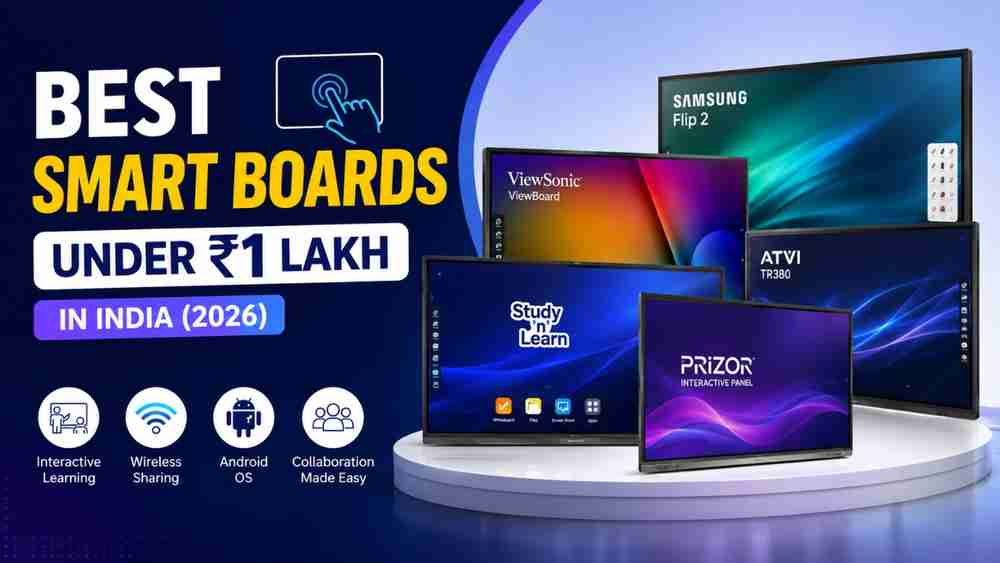
In India, the demand for affordable yet feature-rich interactive flat panels has surged, with many buyers seeking high-quality solutions under the ₹1 lakh budget. This comprehensive guide aims to assist such buyers by comparing five prominent brands in the Indian market: StudyNLearn, ViewSonic ViewBoard, Prizor Interactive Panel, Samsung Flip 2, and ATVI TR380. We will delve into their specifications, features, advantages, and drawbacks to help you make an informed decision in 2026.
What Should You Look for Before Buying a Smart Board?
Before investing in an interactive smart board, it's crucial to understand the key features that contribute to its performance, usability, and overall value. Here are the essential aspects to consider:
- 4K UHD Display
- Android Operating System
- Touch Technology
- RAM & Storage
- Wireless Screen Sharing
- Speakers
- Connectivity
- Warranty & After-Sales Support
Smart Board Comparison Table
To provide a clear overview, here's a comparison table of the five interactive smart board brands, focusing on their 65-inch models where available and relevant specifications.
Feature | StudyNLearn (65-inch) | ViewSonic ViewBoard IFP6533-G (65-inch) | Prizor Interactive Panel (65-inch) | Samsung Flip 2 WM65R (65-inch) | ATVI TR380 (65-inch) |
|---|---|---|---|---|---|
Screen Size | 65 Inches | 64.5 Inches | 65 Inches | 65 Inches | 65 Inches |
Resolution | 4K UHD (3840x2160) | 4K UHD (3840x2160) | 4K UHD (2160p) | 4K UHD (3840x2160) | 4K UHD (3840x2160) |
Android Version | Android 16 | Android 11 | Android 13.0 | Not specified (Tizen OS for Flip 2, Android 14 for WAF series) | Android 14.0 |
Touch Points | 40-point touch | 40-point touch | Multi-touch (High-Speed) | 20-point touch | 40-point touch |
RAM | 8GB DDR5 | 8GB DDR4 | 8GB | Not specified | 8GB |
Storage | 128GB | 128GB | 128GB | Not specified | 128GB |
Built-in Speakers | Yes (Not specified wattage) | Yes (2x16W) | Yes (Not specified wattage) | Yes (Not specified wattage) | Yes (2x20W) |
Connectivity | HDMI Out, USB, Wi-Fi 6, Bluetooth | HDMI-IN x3, USB 3.0 x4, USB-C x1, LAN x2, RS232 x1, Wi-Fi (optional), Bluetooth | HDMI, USB, Wi-Fi | HDMI, USB, Wi-Fi, Bluetooth | HDMI IN, USB 3.0 x2, USB-C x1, LAN, RS232, Wi-Fi 6, Bluetooth 5.0 |
Warranty | Not specified (Check Amazon listing) | Not specified (Check local distributor) | 2 Years | Not specified (Check local distributor) | Not specified (Check retailer) |
Best For | Classrooms (30-40 students) | Interactive & engaging learning | Classrooms, conference rooms, creative spaces | Collaborative meetings & presentations | Modern classrooms & interactive learning |
Approximate Price Range (₹) | ₹80,000 - ₹1,80,000 (general range for 65-inch) | ₹1,12,000 - ₹2,75,000 (Indiamart listings) | ₹21,599 - ₹87,990 (Flipkart/GeM listings) | ₹1,25,000 - ₹4,565,500 (Amazon/Technovibez/Paykobo listings) | ₹104,399 (Edumark Technologies) |
Individual Brand Reviews
StudyNLearn
Overview: StudyNLearn offers interactive flat panels designed specifically for educational environments, emphasizing AI-powered teaching tools and integrated K-12 content. Their 65-inch model is positioned as an ideal solution for medium-sized classrooms with 30-40 students, balancing screen size, visibility, and affordability .
Key Features: The StudyNLearn 65-inch interactive flat panel boasts an Android 16 operating system, 8GB DDR5 RAM, and 128GB storage, ensuring fast performance and smooth multitasking. It supports 40-point multi-touch, allowing for collaborative interaction. A significant highlight is its suite of AI-powered teaching tools, including AI Search for instant content retrieval, AI Image Search for explaining diagrams, a Teaching Resource Assistant, a Question Paper Generator, and a Smart Write Tool that converts handwriting to digital text. It also features 3D simulations for visual learning, wireless screen sharing, and native lesson recording .
Advantages:
- Education-focused AI Tools: The integrated AI features are highly beneficial for teachers, streamlining lesson preparation and delivery.
- Latest Android OS: Android 16 provides a modern and efficient user experience.
- High RAM and Storage: Ample memory and storage support demanding applications and content.
- Multi-touch Capability: Facilitates collaborative learning with multiple users.
Drawbacks:
- Price Range: While positioned as affordable, the general price range for 65-inch models can extend beyond ₹1 lakh, depending on specific features and variants .
- Limited Public Specifications: Detailed specifications for all models are not always readily available without direct inquiry.
Best For: Schools, coaching institutes, and educational setups prioritizing AI-enhanced teaching, interactive content, and robust performance for medium-sized classrooms.
ViewSonic ViewBoard
Overview: ViewSonic is a well-known global brand in display solutions, and their ViewBoard interactive flat panels are designed for both education and business environments. The ViewBoard IFP6533-G is a 65-inch 4K interactive display that emphasizes a comprehensive classroom solution with versatile software and robust hardware .
Display Quality: The IFP6533-G features a 65-inch 4K UHD (3840x2160) TFT LCD panel with DLED Backlight and IPS technology, offering a brightness of 400 nits and a high contrast ratio of 5000:1. It boasts a 9H hardness anti-glare coating, ensuring durability and clear visibility from wide viewing angles (178° H/V) .
Software Experience: Integrated with myViewBoard software, the ViewBoard offers advanced lesson delivery options and device management tools. It supports multitasking with split-screen and picture-by-picture modes, allowing for enhanced lesson delivery. The intuitive user interface and fast app launch contribute to a smooth operation. It runs on Android 11, providing a stable platform for various applications .
Advantages:
- Exceptional Image Quality: 4K UHD resolution with advanced bonding technology provides clear colors and enhanced contrast.
- Comprehensive Software Suite: myViewBoard software offers extensive tools for interactive lessons and remote management.
- USB-C Connectivity: Simplifies classroom setup with a single cable solution for multimedia, data transfer, and 65W power delivery.
- Durable Build: 9H hardness anti-glare coating ensures longevity in demanding environments.
Drawbacks:
- Older Android Version: Android 11 is not the latest, which might limit access to newer apps or features compared to competitors with Android 14 or 16.
- Optional Wi-Fi Module: Wi-Fi connectivity is optional, which might incur additional costs or setup complexity .
- Price: Prices for the IFP6533-G can exceed ₹1 lakh, with some listings on Indiamart showing prices up to ₹2,75,000 .
Best For: Educational institutions and businesses seeking a reliable, high-quality interactive display with a strong software ecosystem and robust build for collaborative and engaging presentations.
Prizor Interactive Panel
Overview: Prizor offers interactive touch panels designed for various settings, including classrooms, conference rooms, and creative spaces. Their 65-inch model emphasizes a high-speed multitouch screen and a user-friendly Android interface .
Features: The Prizor 65-inch Interactive Touch Panel runs on Android 13.0 and comes with 8GB RAM and 128GB internal storage, ensuring smooth performance for applications and media. It features a 4K UHD (2160p) resolution display with a 16:9 aspect ratio. The panel supports high-speed multi-touch interaction and offers multiple connectivity options, including HDMI, USB, and Wi-Fi. Prizor also highlights its sleek and modern aesthetic, making it suitable for professional and educational environments. The product comes with a 2-year warranty .
Advantages:
- Affordable Options: Some listings, particularly on platforms like Flipkart and GeM, show very competitive pricing, with some models significantly under ₹1 lakh .
- Decent Specifications: 8GB RAM and 128GB storage with Android 13.0 provide a solid foundation for most interactive tasks.
- 2-Year Warranty: A standard 2-year warranty offers a reasonable period of coverage.
Drawbacks:
- Limited Detailed Information: Specific details like touch points, speaker wattage, and advanced features are not as extensively documented as some competitors in the readily available information.
- Availability: The Amazon.in listing indicated the product was currently unavailable, which might suggest inconsistent stock .
Best For: Budget-conscious buyers, small to medium-sized classrooms, and meeting rooms looking for a functional interactive panel with essential features at a competitive price point.
Samsung Flip 2
Overview: The Samsung Flip 2 (WM65R) is a 65-inch digital flipchart designed primarily for business and collaborative environments. It aims to replace traditional whiteboards and flipcharts with a digital, interactive solution that emphasizes a natural writing experience and seamless collaboration .
Collaboration Features: The Flip 2 features a 4K UHD resolution display and supports up to 20 pages of writing space per roll, allowing users to scroll through pages seamlessly. It offers a smooth and familiar passive pen experience, enabling users to draw, write, and inspire new ideas. The device supports multiple connectivity options, including Wi-Fi, HDMI, and USB, facilitating easy content sharing and presentation. It also includes built-in speakers and allows users to select, move, crop, capture, and edit images easily .
Advantages:
- Natural Writing Experience: The passive pen and touch input provide a highly intuitive and smooth writing feel, mimicking a traditional whiteboard.
- Business-Focused Design: The interface and features are tailored for meetings, brainstorming sessions, and corporate collaboration.
- Brand Reliability: Samsung is a globally recognized brand known for high-quality displays and reliable technology.
Drawbacks:
- Price: The Samsung Flip 2 is generally positioned at a higher price point, often exceeding the ₹1 lakh budget, with some listings showing prices well above this mark .
- Operating System: It typically runs on Samsung's proprietary Tizen OS, which might have a different app ecosystem compared to Android-based panels.
- Focus: While excellent for business, it might lack some of the specific educational tools found in panels designed primarily for classrooms.
Best For: Corporate meeting rooms, design studios, and businesses prioritizing a premium, highly responsive digital whiteboard experience for brainstorming and collaborative work.
ATVI TR380
Overview: The ATVI TR380 Series Interactive Touch Panel, particularly the 65-inch model, is presented as a robust and proven performer for modern classrooms. It integrates an Android 14.0 system with intelligent AI Note software, aiming to transform traditional lessons into engaging visual experiences .
Teaching Features: The TR380 features a 65-inch 4K UHD (3840x2160) display with a 16:9 aspect ratio, 1.07 billion color depth, and 450 cd/m² brightness, ensuring excellent viewing from wide angles. It offers exceptional touch interactivity with an IR-Infrared panel supporting 40-point touch and precise writing with ±1.5 mm touch accuracy and rapid response times (4ms-8ms). Smart Palm & Elbow Rejection ensures smooth writing. It is powered by a Quad/Octa Core 2.0 GHz ARM A55 CPU, MaliG524 GPU, 8GB RAM, and 128GB storage. It also includes dual 220W integrated speakers .
Collaboration Tools: The panel facilitates collaboration with intuitive tools like a built-in browser, Play Store access, and instant screen and file sharing via QR scan or email. It supports split-screen multitasking and offers comprehensive connectivity with Gigabit Ethernet (RJ45), WiFi 6 (5G/2.4G), Bluetooth 5.0, multiple USB 3.0, HDMI IN/OUT, and USB-C ports. An OPS slot allows for seamless integration of a Windows PC .
Advantages:
- Latest Android OS: Runs on Android 14.0, providing a modern and efficient platform.
- High Performance Hardware: Powerful CPU, GPU, 8GB RAM, and 128GB storage ensure smooth operation.
- Advanced Touch Technology: 40-point touch with high accuracy and palm rejection for a superior writing experience.
- Robust Connectivity: Comprehensive ports and wireless options for versatile integration.
- Durability: Built with 7-Layer Tempered Glass and an Anti-glare layer (9H Hardness) for long-lasting performance .
Drawbacks:
- Price: The listed price of ₹104,399 on Edumark Technologies is just above the ₹1 lakh budget, though it might be available for less through other channels or with discounts .
- Warranty Details: Specific warranty duration was not immediately available on the product page, requiring further inquiry.
Best For: Modern classrooms, educational institutions, and training centers seeking a high-performance, durable, and feature-rich interactive panel with advanced touch and collaboration capabilities.
Which Smart Board Offers the Best Value?
Determining the "best value" depends heavily on specific needs and priorities. Here's a comparative analysis of the five smart boards based on key criteria, followed by recommendations for different buyer segments:
Comparative Analysis
Feature | StudyNLearn | ViewSonic ViewBoard IFP6533-G | Prizor Interactive Panel | Samsung Flip 2 WM65R | ATVI TR380 |
|---|---|---|---|---|---|
Display Quality | Excellent (4K UHD) | Excellent (4K UHD, 400 nits, 5000:1 contrast) | Good (4K UHD 2160p) | Excellent (4K UHD) | Excellent (4K UHD, 450 cd/m², 1.07B colors) |
Performance | High (Android 16, 8GB DDR5 RAM, 128GB Storage) | High (Android 11, Quad-core ARM Cortex, 8GB DDR4 RAM, 128GB Storage) | Good (Android 13.0, 8GB RAM, 128GB Storage) | Good (Tizen OS, responsive) | High (Android 14.0, Quad/Octa Core 2.0 GHz ARM A55 CPU, 8GB RAM, 128GB Storage) |
Software Experience | AI-powered teaching tools, K-12 content | myViewBoard software, multitasking, remote management | User-friendly Android 13.0 | Tizen OS, digital flipchart features | AI Note software, built-in browser, Play Store access |
Ease of Use | Intuitive, AI-assisted | User-friendly, myViewBoard integration | User-friendly Android interface | Natural writing, intuitive collaboration | Intuitive, seamless collaboration |
Touch Accuracy | 40-point touch, precise writing | 40-point Ultra Fine Touch Technology | High-speed multi-touch | 20-point touch, passive pen | 40-point touch, ±1.5 mm accuracy, palm rejection |
Connectivity | Comprehensive (HDMI Out, USB, Wi-Fi 6, Bluetooth) | Comprehensive (HDMI-IN x3, USB 3.0 x4, USB-C x1, LAN x2, RS232 x1, Wi-Fi optional) | Standard (HDMI, USB, Wi-Fi) | Standard (Wi-Fi, HDMI, USB) | Robust (Gigabit Ethernet, WiFi 6, Bluetooth 5.0, multiple USB, HDMI, USB-C) |
After-Sales Support | Not specified (check Amazon) | Not specified (check local distributor) | 2-year warranty | Not specified (check local distributor) | Not specified (check retailer) |
Value for Money | High for education-specific needs | Good for robust features, but higher price | Excellent for budget-conscious buyers | Good for premium collaboration, but highest price | High for performance and durability |
Recommendations
- For Schools: StudyNLearn stands out with its education-focused AI tools, integrated K-12 content, and latest Android OS, making it highly suitable for enhancing classroom engagement and teacher efficiency. The ATVI TR380 is also an excellent choice due to its robust features, advanced touch technology, and durability for a dynamic learning environment.
- For Coaching Institutes: Both StudyNLearn and ATVI TR380 offer strong features for interactive teaching and content delivery. The AI tools in StudyNLearn can significantly reduce preparation time, while ATVI TR380's advanced touch and collaboration features are ideal for dynamic coaching sessions.
- For Colleges/Universities: The ViewSonic ViewBoard IFP6533-G offers a comprehensive solution with its myViewBoard software ecosystem, robust connectivity, and excellent display quality, catering to diverse academic needs. The ATVI TR380 also provides high performance and advanced features suitable for higher education.
- For Corporate Meeting Rooms: The Samsung Flip 2 WM65R is specifically designed for business collaboration, offering a natural writing experience and intuitive features for brainstorming and presentations. Its premium feel and brand reliability are significant advantages in a corporate setting. The ViewSonic ViewBoard is a strong alternative for its robust features and management capabilities.
- For Budget Buyers: The Prizor Interactive Panel offers the most competitive pricing, with some models falling well within the ₹1 lakh budget while still providing essential features like 4K UHD display, 8GB RAM, and Android 13.0. It represents excellent value for money for those with strict budget constraints.
Why Buy from Edumark Technologies?
When considering an investment in interactive smart boards, the choice of vendor is as crucial as the product itself. Edumark Technologies stands out as a reliable partner, offering a comprehensive suite of services that ensure a smooth purchasing and implementation experience. They provide:
- Genuine Products: Edumark Technologies guarantees the authenticity of all products, ensuring that customers receive high-quality, original interactive flat panels from reputable brands.
- Expert Consultation: Their team of experts offers personalized guidance, helping institutions and businesses select the most suitable smart board based on their specific requirements and budget.
- Professional Installation: Beyond just selling products, Edumark Technologies provides professional installation services, ensuring that the smart boards are set up correctly and integrated seamlessly into the existing infrastructure.
- PAN India Delivery: Edumark Technologies offers nationwide delivery, making their products and services accessible to customers across India.
- After-Sales Support: A strong commitment to after-sales support ensures that any technical issues or queries are addressed promptly, minimizing downtime and maximizing product utility.
Edumark Technologies focuses on being an informative partner, providing value beyond just the sale of equipment, and ensuring a positive long-term experience for its customers.
Conclusion
The landscape of interactive smart boards in India offers a diverse range of options under ₹1 lakh, catering to various educational and corporate needs. While each brand presents unique strengths, the ultimate choice should align with specific requirements for teaching, training, or business operations, rather than solely focusing on the lowest price. StudyNLearn and ATVI TR380 emerge as strong contenders for educational settings due to their AI-powered features and robust performance. ViewSonic ViewBoard provides a comprehensive solution with a strong software ecosystem, suitable for both education and business.
The Samsung Flip 2 excels in corporate collaboration with its intuitive digital flipchart experience, albeit at a higher price point. For budget-conscious buyers, the Prizor Interactive Panel offers a compelling balance of features and affordability. By carefully considering factors such as display quality, performance, software experience, touch accuracy, connectivity, and after-sales support, buyers can select an interactive smart board that truly enhances their interactive learning and working environments.
Frequently Asked Questions (FAQs)
Q1: Which smart board is best under ₹1 lakh in India?
For general educational setups and coaching institutes, the ATVI TR380 (65") stands out due to its advanced Android 14.0 system, high RAM/storage capacity, and highly crisp optical zero bonding writing feel. For premium corporate rooms, the Samsung Flip 2 or ViewSonic ViewBoard offer excellent value.
Q2: Is a smart board better than a traditional projector?
Yes, significantly. Smart boards do not suffer from bulb degradation, do not require room dimming, feature interactive multi-touch options, and have built-in computers and audio outputs—making them a comprehensive, all-in-one solution.
Q3: Can an interactive flat panel work without a computer?
Absolutely. Most modern smart boards operate on a built-in Android OS. They feature native web browsers, document viewers, and whiteboarding apps out of the box. You only need an external computer (or an Open Pluggable System/OPS slot accessory) if you require advanced Windows-specific software.
Q4: What screen size is ideal for standard classrooms?
A 65-inch smart board is the ideal sweet spot for rooms hosting 30 to 40 students. For massive lecture halls with over 50 students, a 75-inch or 86-inch board is generally recommended to preserve far-end readability.
Q5: Do these interactive panels require high maintenance?
No. Unlike older interactive whiteboards that required special pens or projectors needing frequent bulb changes, modern interactive flat panels are protected by heavy tempered anti-glare glass. They require nothing more than basic periodic cleaning with a dry microfiber cloth.