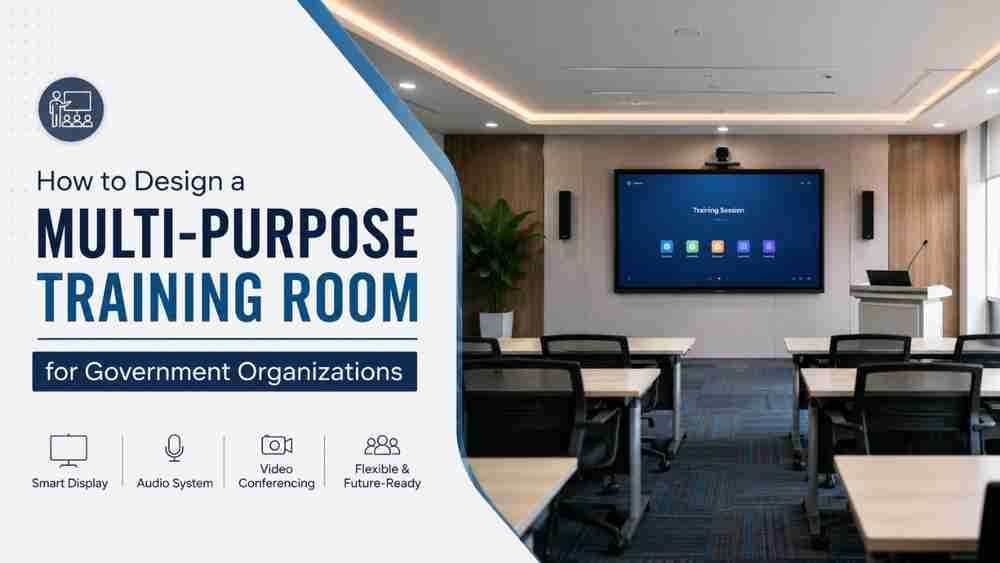
Government organizations are rapidly embracing digital transformation. Whether it is staff training, departmental meetings, policy workshops, webinars, skill development programs, video conferencing, or hybrid learning sessions, a multi-purpose training room has become an essential part of every modern government office.
Traditional meeting halls equipped with only projectors and microphones are no longer sufficient. Today's government departments require intelligent spaces that support seamless collaboration, interactive learning, digital presentations, online meetings, and future-ready communication technologies.
In this complete guide, you'll learn everything about designing a professional multi-purpose training room for government organizations, including room planning, AV equipment, smart boards, audio systems, seating arrangements, video conferencing solutions, and the best implementation practices.
Why Government Organizations Need Multi-Purpose Training Rooms
A well-designed training room can serve multiple purposes throughout the year.
It can be used for:
- Employee induction programs
- Skill development workshops
- Government scheme awareness sessions
- Digital literacy training
- Departmental presentations
- Video conferencing with remote offices
- Hybrid training sessions
- Press briefings
- Vendor demonstrations
- Online certification programs
Instead of creating separate rooms for different purposes, organizations can invest in one flexible training room capable of supporting every type of event.
Benefits of a Modern Training Room
Modern digital training rooms provide several advantages.
Better Employee Engagement
Interactive displays and digital content improve participation compared to traditional whiteboards.
Hybrid Training
Employees from multiple locations can participate through Zoom, Microsoft Teams, or Google Meet.
Reduced Operational Costs
One room supports multiple activities, reducing infrastructure expenses.
Professional Presentations
4K displays, digital podiums, wireless microphones, and PTZ cameras create an impressive learning environment.
Future-Ready Infrastructure
Government organizations can easily integrate AI-powered collaboration tools and future technologies.
Step 1: Understand the Training Room Requirements
Before purchasing equipment, identify the primary objectives.
Ask questions like:
- How many participants will attend?
- Will online participants join remotely?
- Is recording required?
- Will multiple departments use the room?
- Will external agencies conduct workshops?
- Is multilingual presentation support needed?
These answers determine the room size and technology requirements.
Step 2: Choose the Right Room Layout
A flexible seating arrangement improves learning and collaboration.
Common layouts include:
Layout | Best For |
Classroom Style | Employee training |
U-Shape | Discussion sessions |
Boardroom | Official meetings |
Theatre Style | Large seminars |
Collaborative Pods | Group activities |
Furniture should be movable to allow quick reconfiguration.
Step 3: Install an Interactive Smart Board
The interactive display is the heart of any digital training room.
Unlike traditional projectors, smart boards offer:
- 4K Ultra HD display
- Touch writing
- Wireless screen sharing
- Cloud connectivity
- Android operating system
- Annotation tools
- Built-in speakers
- Split screen functionality
These features make presentations more interactive and productive.
Best Interactive Smart Board Brands
Brand | Display Quality | Android | Writing Experience | Best For | Overall Rating |
MAXHUB | Excellent | Yes | Excellent | Government & Corporate | ⭐⭐⭐⭐⭐ |
ATVI | Excellent | Yes | Very Smooth | Schools & Training Rooms | ⭐⭐⭐⭐⭐ |
Teachmint | Very Good | Yes | Good | Education Sector | ⭐⭐⭐⭐☆ |
LG | Premium | Yes | Excellent | Large Conference Rooms | ⭐⭐⭐⭐⭐ |
BenQ | Excellent | Yes | Excellent | Enterprise Collaboration | ⭐⭐⭐⭐⭐ |
The ideal board size depends on room capacity:
- 65-inch: Up to 20 participants
- 75-inch: 20–40 participants
- 86-inch: 40+ participants
Step 4: Professional Audio System
Even the best presentation fails if participants cannot hear clearly.
A professional training room should include:
- Wireless handheld microphones
- Wireless lapel microphones
- Ceiling speakers
- Wall-mounted speakers
- Digital amplifier
- Audio mixer
- Feedback suppressor
Clear audio improves concentration and reduces listener fatigue.
Step 5: PTZ Camera for Hybrid Training
Hybrid training has become standard across government departments.
A professional PTZ camera enables:
- 4K video recording
- AI auto-tracking
- Optical zoom
- Preset camera positions
- Remote operation
- Live streaming
- Video conferencing
This ensures remote participants receive the same experience as those attending in person.
Step 6: Video Conferencing Integration
Government organizations frequently communicate with regional offices and external agencies.
The training room should support platforms like:
- Microsoft Teams
- Zoom
- Google Meet
- Cisco Webex
A complete video conferencing setup should include:
- PTZ Camera
- Speakerphone
- Ceiling microphones
- Interactive display
- High-speed internet
- Dedicated conferencing PC
Step 7: Digital Podium
A digital podium provides centralized control for presenters.
Features include:
- Built-in PC
- Touch monitor
- Microphone integration
- HDMI connectivity
- USB ports
- Document camera compatibility
- Smart board control
It enhances professionalism and simplifies presentations.
Step 8: Proper Lighting
Lighting significantly impacts video quality and participant comfort.
Recommended lighting includes:
- LED ceiling panels
- Anti-glare lighting
- Natural white lighting (4000K–5000K)
- Adjustable brightness controls
Avoid direct lighting on the display to minimize reflections.
Step 9: Acoustic Treatment
Poor acoustics can cause echoes and reduce speech clarity.
Consider:
- Acoustic wall panels
- Sound-absorbing ceiling tiles
- Heavy curtains
- Carpet flooring where appropriate
Good acoustics improve both in-room communication and video conferencing quality.
Step 10: Reliable Network Infrastructure
A stable network is essential for modern training rooms.
Recommended infrastructure:
- Gigabit LAN
- Enterprise-grade Wi-Fi
- Managed network switch
- Secure firewall
- UPS backup
- Cable management
Reliable connectivity prevents interruptions during online sessions.
Suggested Equipment Checklist
Equipment | Purpose |
Interactive Flat Panel | Presentations & Collaboration |
Digital Podium | Presenter Control |
PTZ Camera | Hybrid Training |
Wireless Microphones | Voice Amplification |
Ceiling Speakers | Audio Output |
Audio Mixer | Sound Management |
Conferencing PC | Online Meetings |
UPS | Power Backup |
Network Switch | Connectivity |
Recording System | Session Recording |
Sample Training Room Configuration
Component | Recommended Specification |
Display | 75-inch 4K Interactive Flat Panel |
Audio | Wireless Mic + Ceiling Speakers |
Camera | 4K AI PTZ Camera |
Seating | 30 Participants |
Internet | 1 Gbps LAN |
Recording | Full HD/4K Recording |
Collaboration | Wireless Screen Sharing |
Platform | Teams, Zoom, Google Meet |
Why Choose Edumark Technologies?
When designing a government training room, choosing the right implementation partner is just as important as selecting the equipment.
Edumark Technologies provides complete end-to-end solutions for government organizations, educational institutions, and public sector departments. From consultation and design to installation, integration, training, and after-sales support, the company delivers tailored AV and smart learning environments.
Services include:
- Interactive Flat Panel installation
- Smart Classroom setup
- Multi-purpose Training Room design
- Video Conferencing solutions
- PTZ Camera installation
- Digital Podium setup
- Professional Audio systems
- Hybrid Classroom solutions
- Network and IT infrastructure
- Annual Maintenance and Technical Support
Whether you are upgrading an existing training room or building a new facility, Edumark Technologies helps ensure the solution is scalable, user-friendly, and compliant with modern collaboration needs.
Edumark Technologies is Now GeM Registered
Edumark Technologies is now a Government e-Marketplace (GeM) registered company, making it easier for government departments, ministries, PSUs, autonomous bodies, and educational institutions to procure smart classroom and training room solutions through the official procurement platform.
Government buyers can visit the official GeM portal to search for authorized sellers and products:
Official GeM Website: https://gem.gov.in
You can also search for Edumark Technologies on GeM using the company's Reseller ID.
Edumark GeM Reseller ID: (Please insert your official GeM Reseller ID here.)
Note: Replace the placeholder above with your actual GeM Reseller ID before publishing. I don't know your official ID and won't invent it.
Including your verified GeM details on your website helps build trust with government buyers and simplifies procurement.
Common Mistakes to Avoid
Avoid these issues when planning a training room:
- Choosing an undersized display
- Ignoring room acoustics
- Using consumer-grade audio equipment
- Poor cable management
- Inadequate internet bandwidth
- Lack of power backup
- No recording capability
- Poor camera placement
- Insufficient lighting
- Selecting equipment without future scalability
Future Trends in Government Training Rooms
Training spaces are evolving with new technologies, including:
- AI-assisted meeting transcription
- Voice-controlled presentation systems
- Wireless collaboration tools
- Cloud-based content management
- 4K and 8K displays
- Smart occupancy analytics
- Integrated digital signage
- Remote device management
- AI-enabled PTZ camera tracking
- Paperless training environments
Organizations that invest in scalable infrastructure today will be better prepared for future digital initiatives.
Conclusion
A modern multi-purpose training room is more than a meeting space—it is a strategic investment in workforce development, collaboration, and digital governance. By combining interactive displays, professional audio systems, PTZ cameras, reliable networking, and flexible layouts, government organizations can create an environment that supports both in-person and hybrid training.
Partnering with an experienced solution provider ensures the technology works seamlessly and continues to deliver value over time. With its comprehensive AV expertise and GeM registration, Edumark Technologies is well-positioned to help government departments design and implement future-ready training rooms that are reliable, scalable, and aligned with the needs of modern public-sector organizations.