Technology has completely transformed the way we teach, learn, and collaborate. Traditional blackboards and whiteboards are gradually being replaced by Smart Boards, making classrooms and meeting rooms more interactive, engaging, and productive.
Whether you're a school administrator, coaching institute owner, teacher, college, or business professional, understanding how a smart board works can help you make better technology decisions.
In this complete guide, you'll learn everything about smart boards, including their features, benefits, applications, pricing, and why they are becoming essential in modern classrooms.
What is a Smart Board?
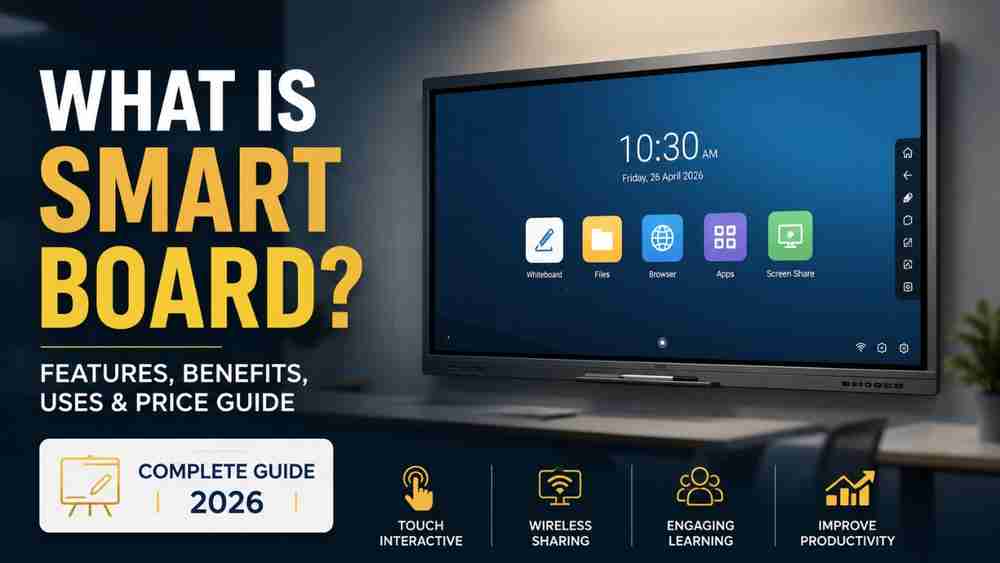
A Smart Board, also known as an Interactive Flat Panel (IFP) or Interactive Digital Board, is a touchscreen display that combines the functionality of a whiteboard, computer, projector, and collaboration tool into one device.
It allows users to:
- Write naturally using a stylus or finger
- Display presentations
- Browse the internet
- Play educational videos
- Conduct online classes
- Annotate documents
- Save notes instantly
- Share screens wirelessly
Unlike traditional whiteboards, smart boards enable real-time interaction with digital content, making teaching and presentations more engaging.
How Does a Smart Board Work?
A smart board is powered by an operating system such as Android or Windows and connects to the internet through Wi-Fi or LAN.
Users can interact directly with the display using touch gestures, digital pens, or fingers.
A smart board can also connect to:
- Laptop
- Desktop PC
- OPS Computer
- Mobile phones
- Tablets
- Document camera
- PTZ Camera
- Wireless screen sharing devices
Many modern smart boards also support cloud storage, allowing teachers to save classroom notes for future use.
Key Features of a Smart Board
Modern smart boards include numerous advanced features that improve productivity.
1. 4K Ultra HD Display
Crystal-clear visuals improve student engagement and reduce eye strain.
2. Multi-Touch Support
Multiple students or presenters can write simultaneously.
3. Digital Whiteboard
Write, erase, highlight, and annotate just like a traditional board.
4. Wireless Screen Sharing
Display content directly from laptops, smartphones, or tablets without cables.
5. Built-in Android System
Run educational apps without requiring a computer.
6. Windows OPS Compatibility
Install an OPS (Open Pluggable Specification) computer to use full Windows software such as:
- Microsoft PowerPoint
- Excel
- Word
- Photoshop
- AutoCAD
- Tally
- Google Chrome
7. Cloud Storage
Save classroom notes and access them anytime.
8. Video Conferencing
Supports platforms like:
- Zoom
- Google Meet
- Microsoft Teams
Perfect for hybrid classrooms.
Benefits of Using a Smart Board
Better Student Engagement
Interactive lessons make learning enjoyable and increase classroom participation.
Improved Teaching Experience
Teachers can explain complex concepts using animations, videos, diagrams, and simulations.
Time Saving
Lesson materials can be saved digitally instead of rewriting notes every day.
Supports Online and Offline Teaching
One device can handle classroom teaching, online classes, and recorded lectures.
Eco-Friendly
Reduces paper usage and marker consumption.
Easy Collaboration
Students and teachers can interact simultaneously on the same screen.
Applications of Smart Boards
Smart boards are used across multiple industries.
Schools
Interactive classroom teaching.
Colleges
Engineering, medical, management, and technical education.
Coaching Institutes
Competitive exam preparation and online classes.
Universities
Hybrid learning environments.
Corporate Offices
Meetings, presentations, brainstorming sessions, and video conferencing.
Training Centers
Employee training and skill development.
Android Smart Board vs Windows Smart Board
Feature | Android Smart Board | Windows Smart Board (OPS) |
Easy to Use | Yes | Yes |
Microsoft Office | Limited | Full Support |
Software Compatibility | Android Apps | All Windows Software |
Performance | Good | Excellent |
Multitasking | Moderate | High |
Best For | Basic Teaching | Professional Teaching & Business |
For teachers who frequently use Microsoft Office, advanced educational software, or multitasking applications, a Windows-enabled smart board with an OPS computer offers greater flexibility.
Smart Board Price in India
The price depends on the screen size, brand, operating system, and additional features.
Approximate price range:
- 65-inch Smart Board: ₹70,000 – ₹1,20,000
- 75-inch Smart Board: ₹95,000 – ₹1,60,000
- 86-inch Smart Board: ₹1,50,000 – ₹3,00,000+
Additional accessories like an OPS computer, PTZ camera, wireless microphone, and installation may increase the overall cost.
Why Schools are Switching to Smart Boards
Educational institutions across India are rapidly adopting smart boards because they:
- Support NEP 2020 digital learning initiatives
- Improve classroom interaction
- Enable hybrid education
- Simplify lesson planning
- Increase student participation
- Enhance visual learning
- Reduce maintenance compared to projectors
As digital education continues to evolve, smart boards have become an essential investment for modern classrooms.
Why Choose Edumark Technologies?
If you're planning to install a smart classroom, Edumark Technologies provides complete digital classroom solutions tailored for schools, colleges, coaching institutes, and corporate organizations.
Services Offered
- Interactive Smart Boards
- Smart Classroom Setup
- Hybrid Classroom Solutions
- Windows OPS Installation
- 4K PTZ Cameras
- Professional Audio Systems
- Installation & Training
- After-Sales Support
The team helps institutions choose the right smart board based on classroom size, teaching requirements, and budget.
Contact Edumark Technologies
Company: Edumark Technologies
Phone: +91 8002805461
Email: info@edumarktechnologies.com
Website: www.edumarktechnologies.com
Frequently Asked Questions (FAQs)
Is a Smart Board better than a projector?
Yes. Smart boards provide better image quality, touch functionality, lower maintenance, and longer lifespan compared to traditional projectors.
Can I use Microsoft PowerPoint on a Smart Board?
Yes. With a Windows OPS computer, you can use PowerPoint, Word, Excel, and other Windows applications seamlessly.
Does a Smart Board require the internet?
No. Basic functions like writing and opening locally stored files work offline. Internet access is only needed for online resources, cloud storage, and video conferencing.
What is the lifespan of a Smart Board?
Most high-quality smart boards have a lifespan of 30,000–50,000 hours, depending on usage and maintenance.
Conclusion
A smart board is much more than a digital replacement for a traditional whiteboard. It is an all-in-one interactive solution that enhances teaching, learning, collaboration, and communication. With features like 4K displays, multi-touch support, wireless connectivity, and compatibility with both Android and Windows, smart boards have become indispensable in modern education and business environments.
If you're planning to upgrade your classroom or meeting room, investing in a high-quality smart board can improve engagement, productivity, and the overall learning experience. Choosing the right solution from a trusted provider like Edumark Technologies ensures professional installation, reliable support, and technology that is built for the future.